✨ Custom Variables: Part 3 — The Variable Window's New Groove ✨
Last time, we explored how Flowchart Variables can be used as inputs for Commands. This time, we’re turning to where you actually see and edit the former: the Variable Window. In Fungus, the old one was:
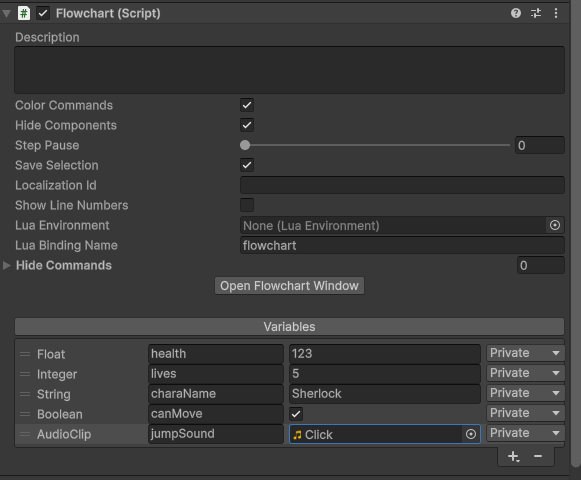
Indeed! The catch, though, was that customizing its look or functionality required diving into editor code. At Atelier Mycelia, we wanted something more artist‑friendly. Thus, we rebuilt it in UI Toolkit.
Pretty much. Same practicality, but now with style points and web-dev-friendliness.
🪄 The New Variable Window 🪄
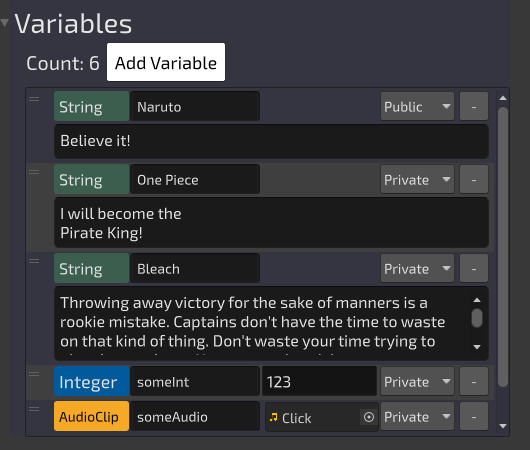
Behold: the glow-up.
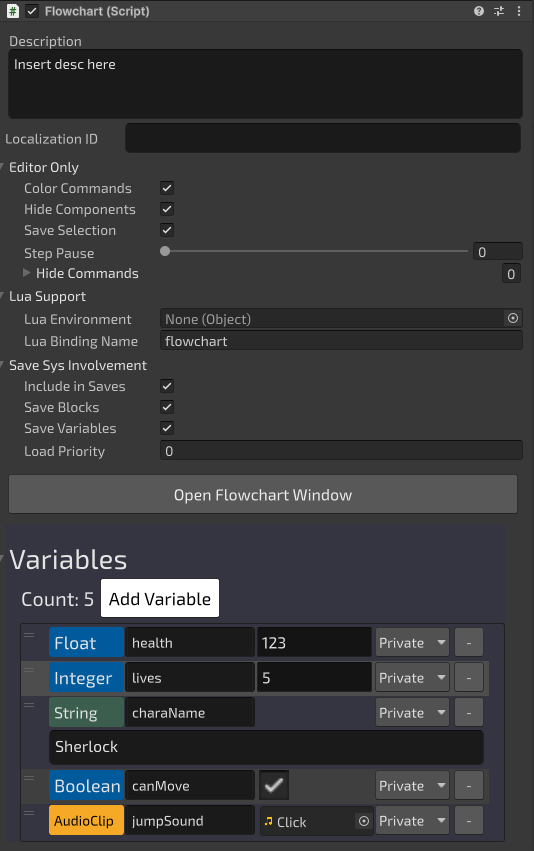

We hope to make people's inner creatives sing, too. With the power of UI Toolkit, you're not limited to fixed heights. For example: the string var entries can expand up to three lines.
Yes, though maybe don’t try to cram the entire D&D Player’s Handbook in there.
The process is straightforward:
- Start with a copy of Amanita’s built‑in VariableRow template (UXML).
- Modify that copy to include the controls needed for your custom type.
- For a Vector2, for example, we added a Vector2Field.
- For an int, an IntField.
- And so on.
Your skill with UI Toolkit is the only limit.
🤝 Programmer + Artist Collaboration 🤝
Not quite. Programmers still need to wire things up. Naps remain optional. As for how they'd do the wiring:
- Create a subclass of RowVisualHandler<TVarContentType>.
- Add a [RowVisualHandler] attribute with four arguments:
- menuName (the submenu where the variable type appears)
- contentType (the type of variable)
- typeDisplayName (the label shown in the menu)
- pathToUxmlTemplate (relative to a Resources folder)
You can see a couple of examples here: https://gist.github.com/CG-Tespy/5c94d936b6e77a1940118adcdc56e2eb
The result:
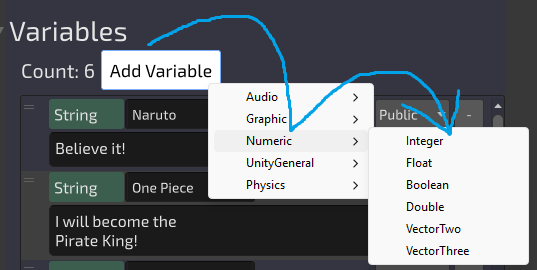
Exactly. Categories like Numeric and Physics keep things organized and easy to scan.
No, it was moved to the Graphic section so it wouldn't be lonely.
🌟 Wrapping Up 🌟
With this new Variable Window, Amanita takes a big step toward being both artist‑friendly and programmer‑extensible. Artists can shape the look and feel of the window and rows, while programmers ensure they function seamlessly in the editor. It’s a collaboration model that reflects our broader design philosophy: tools should empower creativity without sacrificing structure.
We'll let that be a surprise.
Leave a comment
Log in with itch.io to leave a comment.